


Wenzhou Lisheng printing and packaging machinery co, LTD is located in pingyang county, zhejiang province. We have started manufacturing the flexo printing machine since 2005. We are professional manufacturer of various kinds of flexo printing machines including stack type flexo printing machine, central impression flexo presses and inline type flexo printing machine, applicable to printing paper, film non-woven fabrics, woven bag packaging materials, etc. Thanks to state-of-the-art technologies and innovative business ideas, our company products sell well all over the world.
Rich Products
Lisheng specializes in manufacturing high-quality printing machine, including but not limited to: Flexo Printing Machine, Packaging Printing Machine, Flexographic Printer, Paper Printing Machine, Plastic Printing Machine, and Woven Printing Machine, which can be applied to printing paper, film non-woven fabrics, woven bag packaging materials, etc.
Quality Control
Lisheng boasts first-class production facilities located in the industrial heartland of China. Our factory operates under strict quality control supervision and adheres to all international manufacturing practices to ensure every piece of equipment meets the highest standards. All of our products undergo CE and ISO international certifications, ensuring product quality and safety.
Wide Range of Applications
As an international leader in Flexo Printing Machine manufacturing area, Lisheng provides high quality products to customers around the world. Our proudcts are widely used in the field of luxury goods, clothing, food and beverage, sport brand, wine, tea, etc.
Ongoing Support and Service
Our service doesn’t stop when your machine is delivered. We provide full, ongoing training for your team, either at our facility or your location – whatever is most convenient for you. We also supply an assortment of spare parts and consumables, and offer flexible maintenance plans to extend the working life of your machine.
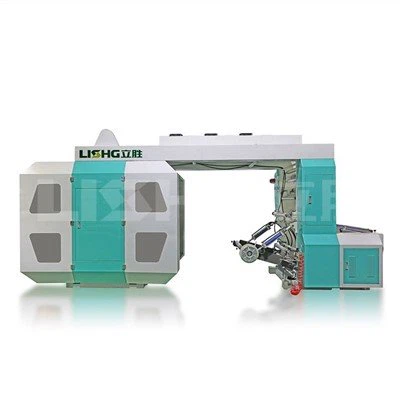


What Is Flexographic Printer?
A flexographic printer is a type of printing press that utilizes flexible relief plates to transfer ink onto various substrates. It is commonly used in large-scale printing operations, delivering high-quality and high-speed printing results. Flexographic printers offer excellent versatility, allowing precise printing on a range of materials such as paper, plastic, cardboard, and flexible packaging.
Flexography is known for providing quality results and its efficiency in speed. The popularity of flexo printing continues to grow, despite widespread digitisation in many printing sectors. Here are main advantages of flexography.
High Quality Paint
Flexography achieves a consistently high level of print quality across a wide range of materials/substrates without the need of special coatings, as it reduces the overall cost per unit. This is a significant advantage over other print solutions which may have a very narrow band of compatible substrates.
High Speed Production
Flexographic printers are designed for high-speed production, enabling rapid printing of large quantities. This makes them a preferred choice for time-sensitive projects, meeting demanding deadlines without compromising print quality.
Versatile Paint Process
Flexographic printing can be applied to a wide range of industries, including textile printing, packaging printing, label printing and more. The versatility of the machines means that presses can be adapted to accommodate different types of order, giving print businesses the ability to diversify their market appeal and remain competitive.
Economic For Medium & High Volume Production
Despite great advances in digital printing, digital is still expensive and comparatively slow for medium and high volume print runs. For the many clients who still require medium to large volume print runs, especially in the label business, flexography wins hands down and can often compete with Digital on short runs too.
One-Off Cost For Plates
Once a plate is made, it can be used an indefinite number of times with no additional costs. This means that the larger the print run, the lower your cost per unit. If looked after correctly, Flexo plates can be reused many times, so that repeat orders can be printed with very few overheads. This often compares favourably with the design and setup time required for digital printing, especially on labour intensive short volume print runs.
In-Line Converting Flexibility
Cycle time is drastically reduced by the in-line converting capacity native to many modern flexographic printers. This means that most print runs can be completed in a single pass. Flexographic printers can integrate many other kinds of in-line processes too, including silk screen, hot foil, cold foil, digital print, variable data print, lamination, booklet insertion, RFID insertion, multi-layer printing, and reverse side print. It is also possible to apply primers, coatings, adhesives and varnishes in-line, cutting overall finishing time.
Possible to Use Different Types of Inks & Drying Systems
Inks and drying systems have developed in complexity and efficiency alongside flexographic print technology itself. A modern flexographic printer can use a variety of water-based or solvent based inks. Efficient drying mechanisms – whether using air heaters, IR or UV Driers – can increase web speed, reduce overall energy consumption and decrease ink usage. Printers have access to a potentially limitless number of colours through easy mixing of modern inks. Precise and repeatable colour formulas can be created that retain faithful consistency even when used on multiple substrates, e.g. company brand colours used on labels, food packaging and textiles.
Easy to Use and Maintain
One of the arguments in favour of digital printing is the supposedly cumbersome setup time required by flexographic printers. While this may have been the case in the old typesetting days, modern flexographic printers actually have very short set up and job changeover time, enhanced by the latest Servo drive systems. Furthermore, a flexographic printer will give you a long production lifespan – and an impressive ROI – with relatively few maintenance requirements, so long as the unit is serviced regularly.
Applications of Flexographic Printer
Flexographic printing's versatility and efficiency make it suitable for a wide range of applications across various industries. Here's a more detailed look at some of the common and diverse uses of flexographic printing:
Food and Beverage
In the food and beverage industry, packaging plays a crucial role in attracting customers. Flexographic printing excels in printing labels for food and beverage packaging, including cans, bottles, jars, and bags. Its ability to produce vibrant colors and high-quality images ensures that your products stand out on the shelf, capturing consumer attention.
Automotive Industries
The automotive industry relies on durable and resistant labels for various parts and components. Flexographic printing offers the advantage of using inks specifically designed to withstand extreme temperatures and harsh environments. Labels maintain their integrity, ensuring important information remains visible and legible.
Chemical Industries
The chemical industry requires labels that can withstand exposure to hazardous materials. Flexographic printing, with its ability to print on plastic or polyethylene film and utilize highly durable inks, ensures accurate and safe labeling for containers storing chemicals. This helps maintain regulatory compliance and ensures safety in handling.
Beer, Wine, and Spirits Industry
Labels play a crucial role in the beer, wine, and spirits industry, where products compete for consumer attention. Flexographic printing enables cost-effective printing on a variety of materials, allowing for bold and vibrant labels that stand out in a crowded marketplace. With this process, you can create visually stunning labels that effectively represent your brand and entice customers.
Components of Flexographic Printer



A flexographic printer consists of various components, each playing a crucial role in the printing process. Let’s take a closer look at the key components:
Anilox Roller
The anilox roller is responsible for transferring ink to the plates. It features tiny cells engraved on its surface, which hold a specific volume of ink. The size and shape of the cells determine the amount of ink transferred, affecting the print quality and color saturation.
Plate Cylinder
The plate cylinder holds the flexographic plates in place. It rotates during the printing process, allowing the plates to come into contact with the substrate and transfer the ink. The plate cylinder’s precise movement ensures accurate registration and consistent printing results.
Doctor Blade
The doctor blade plays a critical role in removing excess ink from the surface of the anilox roller. It ensures that only the required amount of ink is transferred to the plates, preventing ink buildup and maintaining print quality. The doctor blade can be adjusted to control ink density and optimize the printing process.
Impression Cylinder
The impression cylinder applies pressure to the substrate, ensuring proper ink transfer from the plates. It plays a vital role in achieving consistent and uniform prints, especially when dealing with uneven or textured surfaces. The impression cylinder’s pressure can be adjusted to accommodate different substrates and printing requirements.
Types of Flexographic Printer
In-Line Flexographic Printer
The In-Line Flexographic Printer sees colour stations being horizontally placed so that printing can occur on both sides of the substrate with the help of a turn bar. In-line flexographic presses offer the ability to print on heavier substrates. These presses can run at very high speeds. The more colours/processes the longer the press, thus these machine can have a large footprint.
Central Impression Flexographic Printer
The Central Impression Flexographic Printer’s colours are arranged in a circle/ satellite around the large central impression cylinder. It is possible to print on both sides of the substrate, although this can restrict the available printing width, its main advantage is excellent print stability & quality in the form of colour and clarity. These machines are relatively compact for their high capability.
Stack Flexographic Printer
The Stack Flexographic Printer’s colour stations are vertically stacked, which allows operators easy access. Stack presses can print on both sides of a substrate. Stack presses have a small footprint, but access to top & lower print stations can be difficult, but this is the compromise.
Factors to Consider When Choosing a Flexographic Printer
Printing Requirements
The first step in choosing the right Flexographic Printer is to assess your printing requirements. Check out the factors such as the size of the printing material, the desired printing speed, the number of colors needed, and the complexity of the print design. Determine whether you require inline or offline printing, as this will affect the type of machine you need.
Machine Size and Speed
The size and speed of the Flexographic Printer are crucial considerations. Evaluate the available space in your facility and ensure that the machine can fit comfortably. Consider the desired production volume and choose a machine that can meet your output requirements without compromising on print quality.
Substrate Compatibility
Flexo printing is compatible with a wide range of substrates, including paper, film, foil, and various packaging materials. However, not all Flexographic Printers are suitable for every substrate. Ensure that the machine you choose can effectively handle the specific material you intend to print on, considering factors such as thickness, surface finish, and texture.
Plate and Anilox System
The quality of flexo printing largely depends on the plate and anilox system used. Look for a machine that allows for easy plate mounting and precise registration control. Consider the options available for plate and anilox cylinder cleaning, as this will impact the maintenance and longevity of your printing equipment.
Automation and Control
Modern Flexographic Printers come equipped with advanced automation and control features that enhance productivity and efficiency. Consider the level of automation required for your printing operations. Focus for features such as automatic registration control, in-line color measurement, and job memory storage, which can streamline your printing process and minimize errors.
Maintenance and Support
Maintenance and support are essential aspects to consider when investing in a Flexographic Printer. Research the reputation and track record of the manufacturer or supplier. Ensure that they provide comprehensive after-sales support, including maintenance services, spare parts availability, and technical assistance. A reliable support network will help minimize downtime and ensure the longevity of your investment.
Cost Considerations
Finally, assess the overall cost of the Flexographic Printer, including the initial purchase price, installation, training, and ongoing operational amount. While it’s important to consider your budget, remember that quality and reliability should not be compromised for cost savings. Investment in a machine that offers the best value for your money in terms of performance, durability, and long-term productivity.
Maintenance of Flexographic Printer
Flexographic Printers are highly efficient and versatile, capable of producing high-quality prints on a wide range of substrates. However, maintaining these machines in optimal condition is crucial to ensure their longevity and consistent performance. This article provides comprehensive tips for maintaining your Flexographic Printer, ensuring maximum uptime and print quality.
Regular Cleaning
Regular cleaning is paramount for maintaining your Flexographic Printer. The buildup of ink, debris, and dust can hinder performance and affect print quality. Daily cleaning includes removing ink and debris from ink fountains, rollers, and plates. Deep cleaning involves disassembling the machine and thoroughly cleaning all components. This should be done periodically, depending on the frequency of use.
Inspecting Parts
Inspecting all parts of your Flexographic Printer is vital for early detection of potential issues. Regular checks should include examining the condition of plates, cylinders, bearings, and seals. Look for signs of wear, damage, or misalignment. Prompt replacement or repair of faulty parts can prevent costly breakdowns.
Maintaining Anilox Rolls
Anilox rolls are critical components in Flexographic Printer. They transfer ink to the plate, which in turn transfers it to the substrate. Maintaining anilox rolls involves regular cleaning and inspection. Cleaning removes ink buildup and debris, ensuring optimal ink transfer. Inspection checks for damage or wear that could affect print quality.
Checking Inking Systems
The inking system is responsible for delivering ink to the anilox roll. Regular maintenance includes checking the ink supply, filters, and pumps. Ensure proper ink viscosity and flow rate. Lubricate all moving parts to minimize friction and wear. Monitor ink levels to prevent interruptions during printing.
Adjusting Print Settings
Proper print settings are crucial for optimal performance. Factors such as print speed, impression pressure, and ink settings should be adjusted according to the substrate and print job requirements. Incorrect settings can lead to print quality issues, material waste, and machine damage. Make adjustments based on print samples and experience.
Monitoring Electrical Components
Electrical components, such as motors, wiring, and sensors, play a vital role in the operation of a flexo machine. Regular inspections should include checking for loose connections, damaged wires, and overheating. Ensure proper grounding to prevent electrical hazards. Replace faulty components promptly to maintain machine reliability.
Implementing Preventative Maintenance
Preventative maintenance programs are essential for maximizing the lifespan of your Flexographic Printer. This involves scheduled inspections, cleaning, and lubrication. Regular maintenance reduces the likelihood of breakdowns and unplanned downtime, resulting in cost savings and increased productivity. By following these tips, you can maintain your Flexographic Printer in optimal condition, ensuring its reliable operation, consistent print quality, and extended lifespan.
Setup Time
Despite its efficiency in extensive print runs, flexographic printing often demands a relatively longer setup time in comparison to alternative printing methods. This may pose a drawback for businesses with smaller print quantities or those seeking swift turnaround times.
Initial Costs
The investment in flexographic printing equipment entails higher initial costs, presenting a potential hurdle for smaller enterprises or startups. Nevertheless, the cost-effectiveness of managing large print runs can offset this initial investment over time.
Color Limitations
Flexographic printing encounters restrictions concerning color options when juxtaposed with certain digital printing methods. The attainment of a diverse spectrum of colors can prove challenging, impacting the flexibility of design choices for specific applications.

Frequently Asked Questions
Q: What is flexographic printer?
Q: How does a flexographic printer work?
Q: What are benefits of flexographic printers?
Q: What are main components of flexographic printers?
Q: How to choose a flexographic printer?
Q: What are applications of flexographic printer?
Q: What type of ink is used for flexographic printer?
Q: Is offset printing the same as flexographic printing?
Q: Why use flexographic printers?
Q: Can the flexographic printing process be used on many different substrates?
As one of the leading flexographic printer manufacturers and suppliers in China, we warmly welcome you to buy the newest flexographic printer at competitive price from our factory. For pricelist and quotation, contact us now.
machine for heat transfer paper, 3d plastic printer, sublimation printer heat press